Angle monitoring#
Introduction#
Some CRAC files can define angle constraints on network elements.
These are constraints that monitor that the current phase shift between two network elements does not exceed a given
threshold.
OpenRAO allows modelling these constraints in AngleCnec objects.
However, modelling the impact of remedial actions on angle values is highly complex and non-linear. This is why CASTOR
does not inherently support angle constraints.
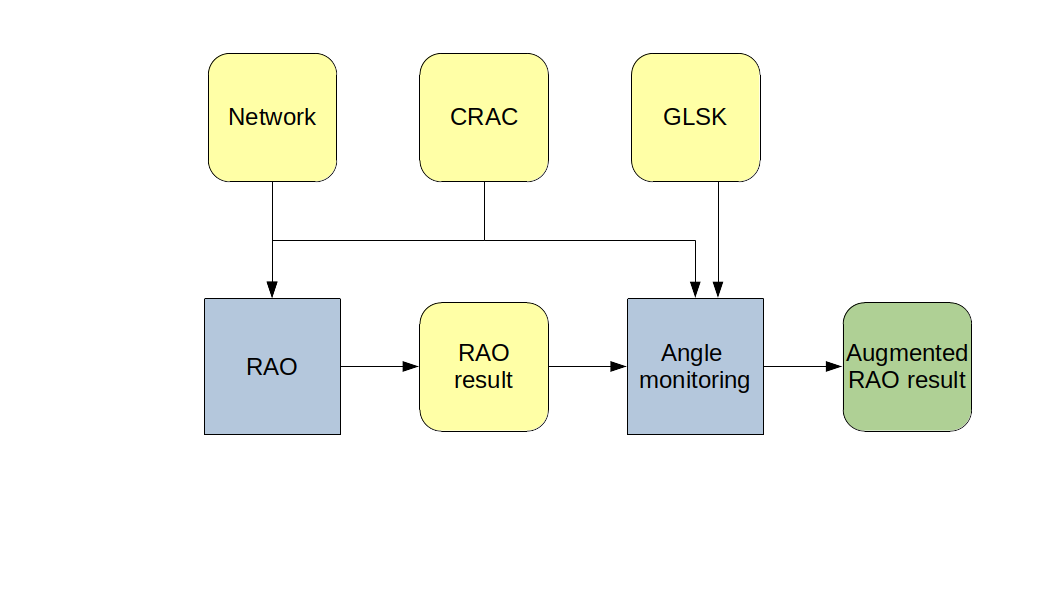
The AngleMonitoring
package allows monitoring angle values after a RAO has been run, and activating re-dispatch remedial actions in case of
constrained elements.
The Java API#
You can easily call the angle monitoring module using the JAVA API:
Build an AngleMonitoring object using:
public AngleMonitoring(Crac crac, Network network, RaoResult raoResult, CimGlskDocument cimGlskDocument)
With:
crac: the CRAC object used for the RAO, and containing AngleCnecs to be monitored.
network: the network to be monitored.
raoResult: the RaoResult object containing selected remedial actions (that shall be applied on the network before monitoring angle values)
cimGlskDocument: the CIM GLSK document that will allow proper application of re-dispatch remedial actions.
Run the monitoring algorithm using the constructed object’s following method:
public RaoResult runAndUpdateRaoResult(String loadFlowProvider, LoadFlowParameters loadFlowParameters, int numberOfLoadFlowsInParallel, OffsetDateTime glskOffsetDateTime)
With:
loadFlowProvider: the name of the load-flow computer to use. This should refer to a PowSyBl load flow provider implementation
loadFlowParameters: the PowSyBl LoadFlowParameters object to configure load-flow computation.
numberOfLoadFlowsInParallel: the number of contingencies to monitor in parallel, allowing a maximum utilization of your computing resources (set it to your number of available CPUs).
glskOffsetDateTime: the timestamp for which the computation is made, as it is necessary to correctly read relevant values from the CIM GLSK file.
💡 NOTE
For now, only CIM GLSK format is supported by the angle monitoring module
Here is a complete example:
Crac crac = ...
Network network = ...
RaoResult raoResult = Rao.find(...).run(...)
CimGlskDocument glsk = ...
LoadFlowParameters loadFlowParameters = ...
OffsetDateTime glskOffsetDateTime = ...
RaoResult raoResultWithAngleMonitoring = new AngleMonitoring(crac, network, raoResult, glsk).runAndUpdateRaoResult("OpenLoadFlow", loadFlowParameters, 2, glskOffsetDateTime);
The angle monitoring result#
The method presented above generates a new RAO result object, which is equivalent to the initial one, augmented by the relevant results of the angle monitoring algorithm :
The computation status of the RAO is updated
The activated network actions are updated
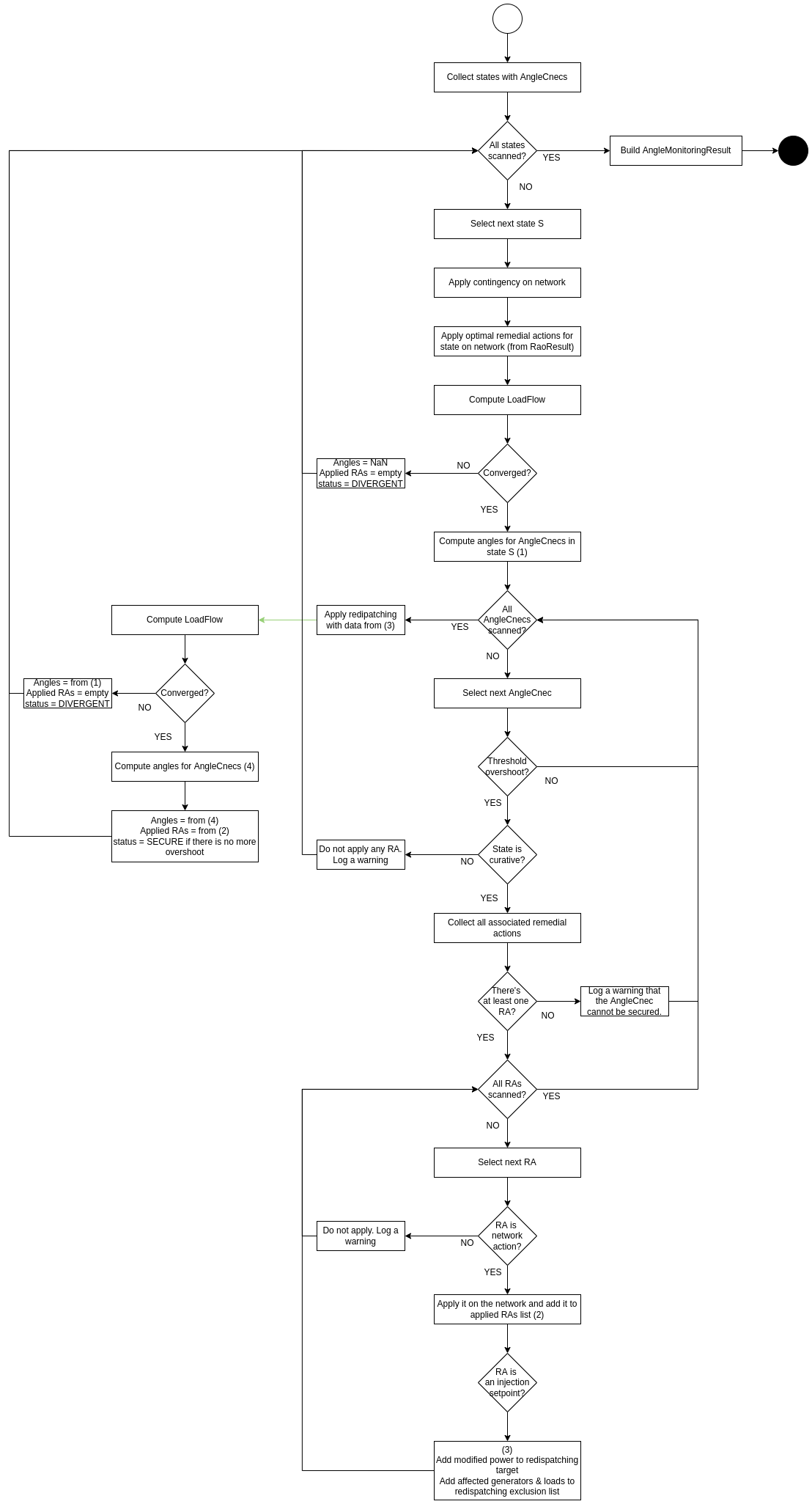
The angle monitoring algorithm#
Here is a detailed description of how the angle monitoring algorithm operates:
Apply optimal preventive remedial actions from RaoResult on the network
From the CRAC, get the set of states on which AngleCnecs exist
For each of these states, monitor angles:
Use a new copy of the network
If the state is not preventive,
apply the contingency on the network
from the RaoResult, apply on the network the optimal remedial actions decided by the RAO (automatic and curative)
Compute load-flow
If it diverges, return the following content for this state, then move on to the next state:
the angles of the angle CNECs equal to NaN
no applied remedial actions
status DIVERGENT
Compute the angles for all angle CNECs, as the maximum phase difference between the 2 voltage levels (1)
Angle in degrees = 180 / pi * (max(angle on buses of exporting voltage level) - min(angle on buses of importing voltage level))
Compare the angles to their thresholds. For the AngleCnecs that have an angle overshoot, get the associated remedial actions (2)
If the AngleCnec has no associated RA, then the angle constraint cannot be remedied: move on to the next AngleCnec.
If the state is preventive, do not apply any PRA (it would be incoherent with the RAO results). Move on to the next state.
For every RA:
If the remedial action is not a network action, do not apply it (if it’s a RangeAction, we cannot know which set-point to use). Move on to the next RA.
If the RA is a network action, apply it on the network.
If any injection-set-point RA was applied, create and apply the re-dispatch that shall compensate the loss of generation / load (3):
The amount of power to re-dispatch is the net sum (generation - load) of power generations & loads affected by the RAs, before changing the set-points
The GLSK to use shall be the same as the one used for the whole process
Exclude from the re-dispatching all the generators & loads that were modified by an injection-set-point RA, since they should not be affected
If any RA was applied, recompute the load-flow
If it diverges, return the following content for this state, then move on to the next state:
the angles of the AngleCnecs equal to what was computed in step (1)
no applied remedial actions
security DIVERGENT
Re-compute all angle values (4)
Create an intermediary result, with angles computed in (4), list of applied remedial actions in (2), and secure flag set to SECURE if there is no more overshoot (after re-verifying thresholds)
Assemble all the state-specific result in one overall result and update the RAO result object
The output logs#
In the logs, the start and end of different steps are logged:
Start and end of the angle monitoring algorithm
Start and end of the monitoring of each state (preventive or post-contingency)
Start and end of each load-flow computation
Also, the following information is logged:
Applied remedial actions to relieve angle constraints
At the end of each state monitoring, the list of remaining angle constraints
At the end of the monitoring algorithm, the list of remaining angle constraints
Example 1:
In this example, a curative constraint (after contingency “Co-1”) induces the implementation of a CRA, but this CRA is
not enough to solve the constraint.
INFO  c.p.o.commons.logs.RaoBusinessLogs - ----- Angle monitoring [start]
INFO  c.p.openrao.commons.logs.TechnicalLogs - Using base network 'urn:uuid:4f4a3f29-6892-49ea-bfc1-92051973c799' on variant 'InitialState'
INFO  c.p.o.commons.logs.RaoBusinessLogs - -- Monitoring angles at state "Co-1 - curative" [start]
INFO  c.p.openrao.commons.logs.TechnicalLogs - Load-flow computation [start]
INFO  c.p.openrao.commons.logs.TechnicalLogs - Load-flow computation [end]
INFO  c.p.o.commons.logs.RaoBusinessLogs - Applying the following remedial action(s) in order to reduce constraints on CNEC "AngleCnec1": RA-1
INFO  c.p.o.commons.logs.RaoBusinessLogs - Redispatching 108.0 MW in BE [start]
INFO  c.p.o.commons.logs.RaoBusinessLogs - Redispatching 108.0 MW in BE [end]
INFO  c.p.o.commons.logs.RaoBusinessLogs - Redispatching 150.0 MW in NL [start]
INFO  c.p.o.commons.logs.RaoBusinessLogs - Redispatching 150.0 MW in NL [end]
INFO  c.p.openrao.commons.logs.TechnicalLogs - Load-flow computation [start]
INFO  c.p.openrao.commons.logs.TechnicalLogs - Load-flow computation [end]
INFO  c.p.o.commons.logs.RaoBusinessLogs - Some AngleCnecs are not secure:
INFO  c.p.o.commons.logs.RaoBusinessLogs - AngleCnec AngleCnec1 (with importing network element _d77b61ef-61aa-4b22-95f6-b56ca080788d and exporting network element _8d8a82ba-b5b0-4e94-861a-192af055f2b8) at state Co-1 - curative has an angle of 5°.
INFO  c.p.o.commons.logs.RaoBusinessLogs - -- Monitoring angles at state "Co-1 - curative" [end]
INFO  c.p.o.commons.logs.RaoBusinessLogs - -- Monitoring angles at state "Co-2 - curative" [start]
INFO  c.p.openrao.commons.logs.TechnicalLogs - Load-flow computation [start]
INFO  c.p.openrao.commons.logs.TechnicalLogs - Load-flow computation [end]
INFO  c.p.o.commons.logs.RaoBusinessLogs - All AngleCnecs are secure.
INFO  c.p.o.commons.logs.RaoBusinessLogs - -- Monitoring angles at state "Co-2 - curative" [end]
INFO  c.p.o.commons.logs.RaoBusinessLogs - Some AngleCnecs are not secure:
INFO  c.p.o.commons.logs.RaoBusinessLogs - AngleCnec AngleCnec1 (with importing network element _d77b61ef-61aa-4b22-95f6-b56ca080788d and exporting network element _8d8a82ba-b5b0-4e94-861a-192af055f2b8) at state Co-1 - curative has an angle of 5°.
INFO  c.p.o.commons.logs.RaoBusinessLogs - ----- Angle monitoring [end]