Advanced
Network elements can be described in an advanced way with reactive limits, loading limits, phase and ratio tap changers.
Reactive limits

The reactive limits may be used to model limitations of the reactive power of generators, VSC converter stations and batteries.
Min-Max reactive limits
With the min-max reactive limits, the reactive power does not depend on the active power. For any active power value, the reactive power value is in the [minQ, maxQ] interval.
Reactive capability curve
With the reactive capability curve limits, the reactive power limitation depends on the active power value. This dependency is based on a curve provided by the user. The curve is defined as a set of points that associate, to each active power value, a minimum and maximum reactive power value. In between the defined points of the curve, the reactive power limits are computed through a linear interpolation.
Reactive capability shape
Note
The reactive capability shape is a beta feature. It is not yet serialized and is not supported across the downstream projects. Exporting a network that contains such limits raises an error unless the beta-feature export is explicitly forced (see below).
With the reactive capability shape limits, the reactive power limitation depends on a 3D (P, Q, U) convex volume.
The volume is defined by a list of planes provided by the user.
Each plane is described by an inequality delta * Q + alpha * U + beta * P ≤ gamma or delta * Q + alpha * U + beta * P ≥ gamma,
where:
alphais the coefficient for the voltage U,betais the coefficient for the active power P,deltais the coefficient for the reactive power Q,gammais the right-hand-side constant.
Additionally, some upper and lower bounds can be defined for each of the P, Q and U variables.
Examples
This example shows how to use the MinMaxReactiveLimits and ReactiveCapabilityCurve classes:
Generator generator = network.getGenerator("G");
if (generator.getReactiveLimits().getKind() == ReactiveLimitsKind.MIN_MAX) {
    MinMaxReactiveLimits limits = generator.getReactiveLimits(MinMaxReactiveLimits.class);
    System.out.println("MinMaxReactiveLimits: [" + limits.getMinQ() + ", " + limits.getMaxQ() + "]");
} else {
    ReactiveCapabilityCurve limits = generator.getReactiveLimits(ReactiveCapabilityCurve.class);
    System.out.println("ReactiveCapabilityCurve:");
    limits.getPoints().forEach(p -> System.out.println("\t" + p.getP() + " -> [" + p.getMinQ() + ", " + p.getMaxQ() + "]"));
}
This example shows how to create a new MinMaxReactiveLimits object:
Generator generator = network.getGenerator("G");
generator.newMinMaxReactiveLimits()
    .setMinQ(-100.0)
    .setMaxQ(100.0)
    .add();
This example shows how to create a new ReactiveCapabilityCurve object:
Generator generator = network.getGenerator("G");
generator.newReactiveCapabilityCurve()
    .beginPoint()
        .setP(-10)
        .setMinQ(-10)
        .setMaxQ(10)
    .endPoint()
    .beginPoint()
        .setP(0)
        .setMinQ(-20)
        .setMaxQ(20)
    .endPoint()
    .beginPoint()
        .setP(10)
        .setMinQ(-15)
        .setMaxQ(-15)
    .endPoint()
    .add();
This example shows how to create a new ReactiveCapabilityShape object. Each plane is added with
addPlane(alpha, beta, delta, isGreaterOrEqual, gamma), where alpha, beta and delta are the
coefficients of U, P and Q, isGreaterOrEqual selects the ≥ (true) or ≤ (false) inequality,
and gamma is the right-hand side. The coefficients, inequality direction and right-hand side are all
passed in the same call, so a plane is fully defined by a single addPlane(...) invocation.
Generator generator = network.getGenerator("G");
// Define a convex PQU region with six bounding planes.
generator.newReactiveCapabilityShape()
        // delta*Q + alpha*U + beta*P  {≤,≥}  gamma
        .addPlane(0.0, 0.0, 1.0, false, 80.0)   // Q ≤ 80
        .addPlane(0.0, 0.0, 1.0, true, -60.0)   // Q ≥ -60
        .addPlane(0.0, 1.0, 1.0, false, 120.0)  // Q + P ≤ 120
        .addPlane(0.0, 1.0, 1.0, true, -50.0)   // Q + P ≥ -50
        .addPlane(1.0, 0.0, 1.0, false, 410.0)  // Q + U ≤ 410
        .addPlane(1.0, 0.0, 1.0, true, 390.0)   // Q + U ≥ 390
        .add();
Loading Limits
Some equipment has operational limits regarding the current, active power or apparent power value, corresponding to the equipment’s physical limitations (related to heating).
Loading limits can be declined into active power limits (in MW), apparent power limits (in kVA) and current limits (in A). They may be set for lines, boundary lines, tie lines (via their boundary lines), two-winding transformers and three-winding transformers. The active power limits are in absolute value.
High loading limits
Note
High loading limits is the only kind of limit that is currently serialized and fully supported by downstream projects.
High loading limits are defined by one permanent limit and any number of temporary limits (zero or more). The permanent limit sets the current, active power or apparent power absolute value under which the equipment can safely be operated for any duration. The temporary limits can be used to define higher current, active power or apparent power limitations corresponding to specific operational durations. A temporary limit thus has an acceptable duration.
The component on which the current limits are applied can safely remain between the preceding limit (it could be another temporary limit or a permanent limit) and the limit directly above for a duration up to the acceptable duration of the limit directly above. Please look at this scheme to fully understand the modeling (the following example shows current limits, but this modeling is valid for all high loading limits):


Note that, following this modeling, in general, the last temporary limit (the higher one in value) should be infinite with an acceptable duration different from zero, except for tripping current modeling where the last temporary limit is infinite with an acceptable duration equal to zero. If temporary limits are modeled, the permanent limit becomes mandatory. If no temporary limit is present, then the acceptable duration above the permanent limit will be infinite.
To create a high loading limit:
Network network = //our network;
Line line = network.getLine("my line name");

line.newOperationalLimitsGroup2("group").newCurrentLimits()
    .setPermanentLimit(600)
    .beginTemporaryLimit()
    .setName("10'")
    .setAcceptableDuration(60 * 10)
    .setValue(1000)
    .endTemporaryLimit()
    .add();
The detection kind is high by default, there is no need to specify it.
Low loading limits
Note
Import / export of low limits is available starting from IIDM 1.18 (PowSyBl 7.4.0). Networks that contain low limits can be exported to IIDM 1.17 or earlier, but the low limits are converted to high limits. See converting low limits to high limits for details.
Low limits might not yet be supported by downstream projects (powsybl-open-loadflow, powsybl-dynawo, etc.).
Please consult the documentation of each project to verify support. In general, lack of explicit mention means no support.
If you’re unsure, feel free to reach out to the PowSyBl community here
Low loading limits are defined by one or more temporary limits (each having an acceptable duration). Contrary to high loading limits, low loading limits do not have a permanent limit.
The component on which the current limits are applied can safely remain at a given level (between the preceding limit and the limit above) for a duration up to the acceptable duration of the limit directly below the given level ( contrary to high limit where it’s the acceptable duration of the limit directly above). Please look at this scheme to fully understand the modeling (the following example shows current limits, but this modeling is valid for all low loading limits):
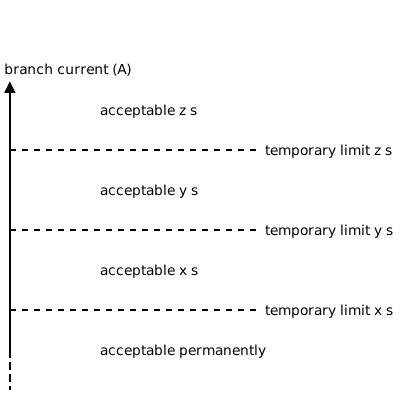

To create a low loading limit:
Network network = //our network;
Line line = network.getLine("my line name");

line.newOperationalLimitsGroup2("low limit").newCurrentLimits()
            .setDetectionKind(DetectionKind.LOW)
            .beginTemporaryLimit()
            .setName("40'")
            .setAcceptableDuration(60 * 40)
            .setValue(500)
            .endTemporaryLimit()
            .beginTemporaryLimit()
            .setName("10'")
            .setAcceptableDuration(60 * 10)
            .setValue(900)
            .endTemporaryLimit()
            .beginTemporaryLimit()
            .setName("5'")
            .setAcceptableDuration(60 * 5)
            .setValue(1200)
            .endTemporaryLimit()
            .add();
The detection kind is high by default, we need to specify that we want a low limit.
Converting low limits to high limits
When converting a low limit to a high limit, the goal is that querying the acceptable duration for a given value in the limit should yield the same acceptable duration and name of the limit after converting the low limit to the high limit.
That means, with \(V\) the set of all possible values for the equipment having the limit, with \(L\) the function that gives the acceptable duration for a value \(v \in V\) on the set of low limits, \(H\) the function that gives the acceptable duration for a value \(v \in V\) on the set of high limits (converted from low limits), then
Here is a scheme to represent the conversion:


The first temporary of the low limit is used as the permanent limit of the high limit. Then each temporary limit is built as such:
1st temporary limit of the high: value of the 2nd temporary of the low + name and duration of 1st temporary of the low
2nd temporary of the high: value of the 3rd temporary of the low + name and duration of the 2nd temporary of the low
etc…
last temporary of the high: value at infinity + name and duration of the last temporary of the low
Limit group collection
In network development studies or in an operational context (CGMES), we can have a set of operational limits according to the season (winter vs summer, for example), the time of the day (day vs night) etc. In PowSyBl, users can store a collection of limits:
Active power limits, apparent power limits and current limits are gathered into an
OperationalLimitsGroupobject.Lines, transformers (and other mentioned above in Loading limits) are associated with a collection of
OperationalLimitsGroup(one collection per side/leg). Users can then choose one or moreOperationalLimitsGroupto activate according to their needs.
OperationalLimitsGroup objects have an id, and may have properties — which allow associating additional arbitrary data items under the general schema of pairs <Key, Value>.
Note that unlike the properties on the network components, no notification is emitted when a property is added, changed or removed.
Examples
Four examples are provided below, with their corresponding limits scheme, to show clearly how to create new CurrentLimits instances.
First example
This first example creates a CurrentLimits instance containing one permanent limit and two temporary limits.
CurrentLimits currentLimits = network.getBoundaryLine("DL").newCurrentLimits()
    .setPermanentLimit(100.0)
    .beginTemporaryLimit()
        .setName("TL1")
        .setValue(120.0)
        .setAcceptableDuration(20 * 60)
    .endTemporaryLimit()
    .beginTemporaryLimit()
        .setName("TL2")
        .setValue(140.0)
        .setAcceptableDuration(10 * 60)
    .endTemporaryLimit()
    .add();


Second example
This second example creates a CurrentLimits instance containing one permanent limit and three temporary limits, one of them having an infinite limit value.
CurrentLimits currentLimits = network.getBoundaryLine("DL").newCurrentLimits()
    .setPermanentLimit(700.0)
    .beginTemporaryLimit()
        .setName("IT20")
        .setValue(800.0)
        .setAcceptableDuration(20 * 60)
    .endTemporaryLimit()
    .beginTemporaryLimit()
        .setName("IT10")
        .setValue(900.0)
        .setAcceptableDuration(10 * 60)
    .endTemporaryLimit()
    .beginTemporaryLimit()
        .setName("IT1")
        .setValue(Double.POSITIVE_INFINITY)
        .setAcceptableDuration(60)
    .endTemporaryLimit()
    .add();


Third example
This third example shows how to create multiple OperationalLimitsGroup on the same end, and set one of these as the selected (active) one.
Line line = network.getLine("Line");

line.newOperationalLimitsGroup1("SUMMER")
        .newCurrentLimits()
        .setPermanentLimit(60)
        .beginTemporaryLimit()
        .setName("TATL-10")
        .setValue(80)
        .setAcceptableDuration(10 * 60)
        .endTemporaryLimit()
        .add();

line.newOperationalLimitsGroup1("WINTER")
        .newCurrentLimits()
        .setPermanentLimit(100)
        .beginTemporaryLimit()
        .setName("TATL-10")
        .setValue(120)
        .setAcceptableDuration(10 * 60)
        .endTemporaryLimit()
        .add();

line.setSelectedOperationalLimitsGroup1("WINTER");
In this example, there is two sets of limits on the same line side (1). The selected set is the winter one: the limits violations will be tested against this set.
Note that all setSelected methods will only keep a single set of limit activated at a time. Selecting “WINTER” then “SUMMER” this way will result in the only active group
being the last selected (aka “SUMMER”).
To have multiple OperationalLimitsGroup selected at the same time, see below the fourth example.
Fourth example
This fourth example creates three OperationalLimitsGroup on the same end, and sets all of them as selected (active).
final String activatedOneOne = "activated_1_1";
final String activatedOneTwo = "activated_1_2";

Line line = network.getLine("Line");

// create the default operational limits group and select it
line.getOrCreateSelectedOperationalLimitsGroup1().newCurrentLimits().setPermanentLimit(500).add();
// create two other operational limits group
line.newOperationalLimitsGroup1(activatedOneOne).newCurrentLimits()
        .setPermanentLimit(1100)
        .beginTemporaryLimit()
        .setName("10'")
        .setAcceptableDuration(10 * 60)
        .setValue(1200)
        .endTemporaryLimit()
        .beginTemporaryLimit()
        .setName("1'")
        .setAcceptableDuration(60)
        .setValue(1500)
        .endTemporaryLimit()
        .beginTemporaryLimit()
        .add();

line.newOperationalLimitsGroup1(activatedOneTwo).newCurrentLimits()
        .setPermanentLimit(300)
        .beginTemporaryLimit()
        .setName("40'")
        .setAcceptableDuration(40 * 60)
        .setValue(700)
        .endTemporaryLimit()
        .beginTemporaryLimit()
        .setName("0.5'")
        .setAcceptableDuration(30)
        .setValue(1600)
        .endTemporaryLimit()
        .beginTemporaryLimit()
        .setName("N/A") //there is no need to explicitly create this limit for the acceptable duration above the last temporary limit to be 0, this is just an example
        .setAcceptableDuration(0)
        .setValue(Double.MAX_VALUE)
        .endTemporaryLimit()
        .add();

// select the two other limits group on the side 1, no need to select the first created group, the function we used already selected it
line.addSelectedOperationalLimitsGroups(TwoSides.ONE, activatedOneOne, activatedOneTwo);
We thus have 3 OperationalLimitsGroup selected on the side 1 of the line. Note that not all created groups need to be activated,
here all are activated, but we could have activated only 2 out of 3 (or 1 out of 3).
Each activated group can return information about the acceptable duration (which can be different depending on the group).
The spacing on the y axis (branch current) is not to scale.

Permanent limit without any temporary limit
In the case of a group containing only a permanent limit (without any temporary above), there is no information available for the acceptable duration. The default acceptable duration has been chosen as infinite.
If you wish to have an acceptable duration of 0 instead, create a temporary limit with an acceptable duration of 0 and a value of Double.MAX_VALUE.
Phase tap changer
A phase tap changer can be added to either two-winding transformers or three-winding transformers’ legs.
Specifications
A phase tap changer is described by a set of tap positions (or steps) within which the transformer or transformer leg can operate. Additionally, to that set of steps, it is necessary to specify:
the lowest tap position
the highest tap position
the position index of the current tap (which has to be within the highest and lowest tap position bounds)
the solved position index of the tap that represents the index after a calculation
whether the phase tap changer can change tap positions onload or only offload
If the phase tap changer can change tap positions onload, regulation is specified as follows:
whether the tap changer is regulating or not
the regulation mode, which can be
CURRENT_LIMITER,ACTIVE_POWER_CONTROL: the tap changer either regulates the current or the active power.the regulation value (either a current value in
Aor an active power value inMW)the regulating terminal, which can be local or remote: it is the specific connection point on the network where the setpoint is measured.
the target deadband, which defines a margin on the regulation so as to avoid an excessive update of controls
Each step of a phase tap changer has the following attributes:
Attribute |
Unit |
Description |
|---|---|---|
\(r_{\phi, tap}\) |
% |
The resistance deviation in percent of nominal value |
\(x_{\phi, tap}\) |
% |
The reactance deviation in percent of nominal value |
\(g_{\phi, tap}\) |
% |
The conductance deviation in percent of nominal value |
\(b_{\phi, tap}\) |
% |
The susceptance deviation in percent of nominal value |
\(\rho_{\phi, tap}\) |
p.u. |
The voltage ratio in per unit of the rated voltages |
\(\alpha_{\phi, tap}\) |
\(^{\circ}\) |
Angle difference |
Example
This example shows how to add a phase tap changer to a two-winding transformer:
twoWindingsTransformer.newPhaseTapChanger()
    .setLowTapPosition(-1)
    .setTapPosition(0)
    .setLoadTapChangingCapabilities(true)
    .setRegulating(true)
    .setRegulationMode(PhaseTapChanger.RegulationMode.CURRENT_LIMITER)
    .setRegulationValue(25)
    .setRegulationTerminal(twoWindingsTransformer.getTerminal2())
    .beginStep()
        .setAlpha(-10)
        .setRho(0.99)
        .setR(1.)
        .setX(2.)
        .setG(0.5)
        .setB(0.5)
        .endStep()
    .beginStep()
        .setAlpha(0)
        .setRho(1)
        .setR(1.)
        .setX(2.)
        .setG(0.5)
        .setB(0.5)
        .endStep()
    .beginStep()
        .setAlpha(10)
        .setRho(1.01)
        .setR(1.)
        .setX(2.)
        .setG(0.5)
        .setB(0.5)
        .endStep()
    .add()
Ratio tap changer
A ratio tap changer can be added to either two-winding transformers or three-winding transformers’ legs.
Specifications
A ratio tap changer is described by a set of tap positions (or steps) within which the transformer or transformer leg can operate (or be operated offload). Additionally, to that set of steps, it is necessary to specify:
the lowest tap position
the highest tap position
the position index of the current tap (which has to be within the highest and lowest tap position bounds)
the solved position index of the tap that represents the index after a calculation
whether the ratio tap changer can change tap positions onload or only offload
If the ratio tap changer can change tap positions onload, regulation is specified by:
if the tap changer is regulating,
loadTapChangingCapabilitiesmust be set totruethe regulation mode, for more information see Voltage Regulation - Characteristics - Mode
the regulation value, for more information see Voltage Regulation - Characteristics - TargetValue
the regulating terminal, for more information see Voltage Regulation - Characteristics - Terminal
the target deadband, for more information see Voltage Regulation - Characteristics - TargetDeadBand
Each step of a ratio tap changer has the following attributes:
Attribute |
Unit |
Description |
|---|---|---|
\(r_{r, tap}\) |
% |
The resistance deviation in percent of nominal value |
\(x_{r, tap}\) |
% |
The reactance deviation in percent of nominal value |
\(g_{r, tap}\) |
% |
The conductance deviation in percent of nominal value |
\(b_{r, tap}\) |
% |
The susceptance deviation in percent of nominal value |
\(\rho_{r, tap}\) |
p.u. |
The voltage ratio in per unit of the rated voltages |
Example
This example shows how to add a ratio tap changer to a two-winding transformer:
twoWindingsTransformer.newRatioTapChanger()
    .setLowTapPosition(-1)
    .setTapPosition(0)
    .setLoadTapChangingCapabilities(true)
    .newVoltageRegulation()
        .withRegulating(true)
        .withMode(RegulationMode.VOLTAGE)
        .withTargetValue(25)
        .withTerminal(twoWindingsTransformer.getTerminal1())
        .add()
    .beginStep()
        .setRho(0.95)
        .setR(1.)
        .setX(2.)
        .setG(0.5)
        .setB(0.5)
        .endStep()
    .beginStep()
        .setRho(1)
        .setR(1.)
        .setX(2.)
        .setG(0.5)
        .setB(0.5)
        .endStep()
    .beginStep()
        .setRho(1.05)
        .setR(1.)
        .setX(2.)
        .setG(0.5)
        .setB(0.5)
        .endStep()
    .add()
Voltage Regulation
A Voltage Regulation models the behavior of equipment that can regulate voltage either directly or through the control of reactive power, in order to regulate voltage. Unlike in CGMES, the VoltageRegulation object isn’t shared: each IIDM object capable of voltage regulation have its own.
Here the list of objects capable of such regulation by authorized mode:
Equipment |
Voltage |
Reactive Power |
Voltage Per Reactive Power |
Reactive Power Per Active Power |
|---|---|---|---|---|
X |
X (*) |
|||
X |
X (*) |
X (Not yet implemented) |
||
X (*) |
X (*) |
|||
X |
||||
X |
X |
X |
||
X |
X (*) |
|||
X |
X (*) |
(*) The terminal is required
Characteristics
Attribute |
Unit |
Description |
|---|---|---|
\(TargetValue\) |
kV or MVar |
The voltage target or the reactive target at regulating terminal |
\(TargetDeadband\) |
kV |
The deadband used to avoid excessive update of controls ( |
\(Slope\) |
kV per MVar |
The sensibility of the voltage with respect to reactive power ( |
\(Terminal\) |
The regulating Terminal which can be remote or local |
|
\(Mode\) |
The kind of regulation |
|
\(Regulating\) |
True if the equipment is regulating, false otherwise |
Specifications
The voltageRegulation is optional. If it is missing, the equipment is not regulating.
If the voltageRegulation is absent, the localTargetQ must be set so that localTargetQ is mandatory for the following equipment to compute their reactive power injection:
The values Regulating and Mode are always required. TargetValue is required when the Terminal is set.
Terminal is optional. If not set, the local terminal of the connectable will be used.
Once a Terminal has been set, it is considered a Remote terminal even if it is the connectable Terminal (local).
For the VoltageSourceConverter, the Terminal, when set, must be the same as the PccTerminal.
TargetValue is used only when the Terminal is set. Otherwise, the local target voltage or reactive value is used.
Regulation Mode has the following values :
VOLTAGEREACTIVE_POWERVOLTAGE_PER_REACTIVE_POWERREACTIVE_POWER_PER_ACTIVE_POWER
The optional Slope attribute is relevant for:
VOLTAGE_PER_REACTIVE_POWER: it corresponds to the \(\lambda\) in \(U_0 = U + \lambda \times Q\)REACTIVE_POWER_PER_ACTIVE_POWER: it corresponds to the \(tan(\phi)\) in \(Q = tan(\phi) \times P\)
The optional TargetDeadband is only pertinent for objects with discrete (as opposed to continuous) voltage regulation, which is the case for RatioTapChanger and ShuntCompensator
Example
This example shows how to add a voltage regulation to a generator with remote regulation:
when we create a new generator:
generatorAdder.newVoltageRegulation()
    .withTargetValue(120)
    .withMode(RegulationMode.REACTIVE_POWER)
    .withRegulating(true)
    .withTerminal(regulatingTerminal)
    .add();
when the generator already exists:
generator.newVoltageRegulation()
    .withTargetValue(120)
    .withMode(RegulationMode.REACTIVE_POWER)
    .withRegulating(true)
    .withTerminal(regulatingTerminal)
    .build();