Write the Java code to perform security analysis#
A security analysis is a simulation run on a network to check for violations.
To have more information about the contingencies we want to simulate and the network elements we want to monitor
please refer to the Powsybl security analysis documentation page.
What will you build?#
This tutorial presents 4 use cases of security analysis simulation. Each example follows a brief and straightforward workflow, using input data that includes an XIIDM file and at least one contingency.
The three workflows can be summarized as follows:
Network + contingency                       --> Security Analysis
Network + contingency + operators strategy  --> Security Analysis
Network + contingency + limit reduction     --> Security Analysis
Network + contingency + state monitor       --> Security Analysis
Tutorial steps#
Loading the network is a common step for all workflows. Then:
Define a contingency and run the security analysis.
Add operator strategies and reference the associated actions.
Configure limit reduction parameters.
Add state monitor parameters.
Import the network from an XML IIDM file#
The network we use here is available in the tutorial’s resources and is described in the IIDM format. Start by adding the following lines in the main function of the tutorial:
Network network = Network.read("network.xiidm", SecurityAnalysisTutorials.class.getResourceAsStream("/network.xiidm"));
We now have a network in memory.
The following are shown in the (Network Area Diagram) below.
4
voltage levelsThere is one
generatorin the voltage levelsVLGEN.There is one
loadon the voltage levelsVLLOAD.The voltage levels
VLHV1andVLHV2they are connected by two parallel lines.
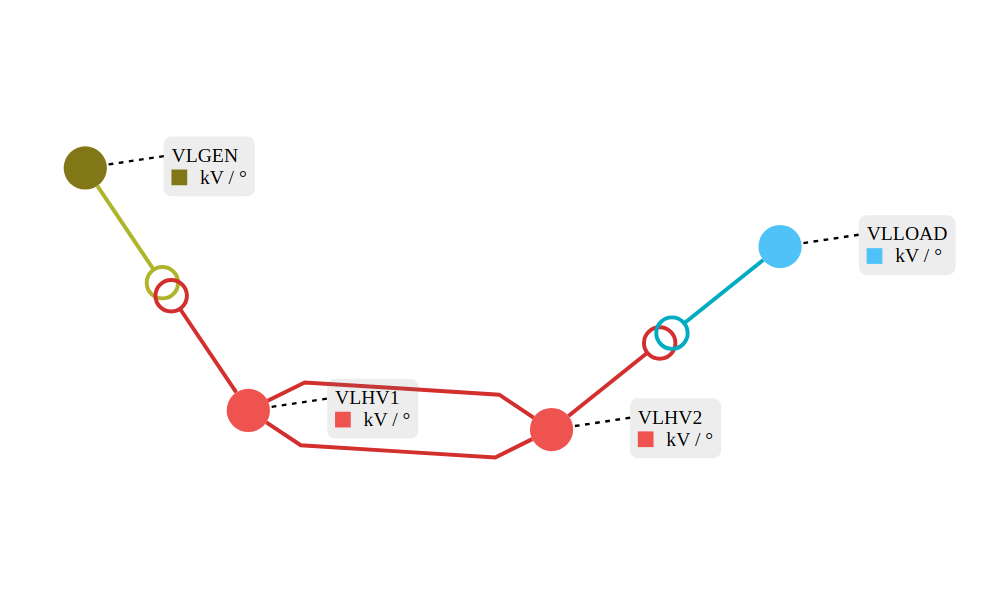
Create a contingency#
Before creating a contingency, make sure that contingency can actually cause a network violation.
As an example, we will add a limit to the line NHV1_NHV2_1 to simulate a default violation.
network.getLine("NHV1_NHV2_1")
        .getOrCreateSelectedOperationalLimitsGroup1("DEFAULT")
        .newCurrentLimits()
        .setPermanentLimit(460)
        .add();
network.getLine("NHV1_NHV2_1").setSelectedOperationalLimitsGroup1("DEFAULT");
Next, on the other line NHV1_NHV2_2, we can add a contingency.
Contingency contingency = Contingency.line("NHV1_NHV2_2");
Now the security-analysis inputs are prepared, we can run a security analysis. This is done in the following way.
SecurityAnalysis.run(network, List.of(contingency));
Here are the corresponding prints in the tutorial:
:: SecurityAnalysis :: network and contingency
Pre contingency results
Post contingency results
    Contingency : NHV1_NHV2_2
	 	  Violation Value: 1008.9287882269946 MW/°
	 	  Violation Limit: 460.0 MW/°
Operator strategy results
Create an operator strategy with actions#
LoadAction loadAction = new LoadActionBuilder()
        .withId("loadActionId")
        .withLoadId("LOAD")
        .withActivePowerValue(300)
        .withRelativeValue(false)
        .build();
GeneratorAction generatorAction = new GeneratorActionBuilder()
        .withId("generatorActionId")
        .withGeneratorId("GEN")
        .withActivePowerValue(300)
        .withActivePowerRelativeValue(false)
        .build();

OperatorStrategy operatorStrategy = new OperatorStrategy("id1", ContingencyContext.specificContingency(contingency.getId()),
        List.of(new ConditionalActions("stage1", new TrueCondition(), List.of(loadAction.getId(), generatorAction.getId()))));

SecurityAnalysisRunParameters parameters = new SecurityAnalysisRunParameters();
parameters.addOperatorStrategy(operatorStrategy);
parameters.addAction(loadAction);
parameters.addAction(generatorAction);

// Run security analysis
SecurityAnalysis.run(network, List.of(contingency), parameters);
Here are the corresponding prints in the tutorial:
:: SecurityAnalysis :: network, contingency, operator strategies and actions
Pre contingency results
Post contingency results
    Contingency : NHV1_NHV2_2
	 	  Violation Value: 1008.9287882269946 MW/°
	 	  Violation Limit: 460.0 MW/°
Operator strategy results
    OperatorStrategy : id1
        Violation Value: 516.0706108379493 MW/°
        Violation Limit: 460.0 MW/°
Create a limit reduction#
Note that the limit reductions also affect the pre-contingency violations results.
As an example, we are going to reduce the current limit of NHV1_NHV2_1 line by 10%.
// Limit Reduction
LimitReduction limitReduction = LimitReduction.builder(LimitType.CURRENT, 0.9)
        .withMonitoringOnly(false)
        .withContingencyContext(ContingencyContext.all())
        .build();
parameters.addLimitReduction(limitReduction);

// Run security analysis
SecurityAnalysis.run(network, List.of(contingency), parameters);
Here are the corresponding prints in the tutorial:
:: SecurityAnalysis :: network, contingency and limit reduction
Pre contingency results
    Value: 456.7689759899928 MW/°
    Limit: 460.0 MW/°
Post contingency results
    Contingency : NHV1_NHV2_2
        Violation Value: 1008.9287882269946 MW/°
        Violation Limit: 460.0 MW/°
Operator strategy results
Use state monitor#
A StateMonitor provides information about the state of network elements we want to monitor such as branch, bus and three-winding transformers…
As an example, we are going to add state monitor parameter, we will add branch and voltage levels ids that we want to monitor.
Contingency contingency = Contingency.line("NHV1_NHV2_2");
SecurityAnalysisRunParameters parameters = new SecurityAnalysisRunParameters();
// State Monitor
StateMonitor stateMonitor = new StateMonitor(new ContingencyContext(contingency.getId(), SPECIFIC),
        Set.of("NHV1_NHV2_1"), // <= branch id
        Set.of("VLGEN", "VLHV1", "VLHV2", "VLLOAD"), // <= Voltage Levels id
        Set.of());
parameters.addMonitor(stateMonitor);

// Run security analysis
SecurityAnalysis.run(network, List.of(contingency), parameters);
Here are the corresponding prints in the tutorial:
:: SecurityAnalysis :: network, contingency and state Monitor
Pre contingency results
Post contingency results
        Contingency : NHV1_NHV2_2
        branchResult: BranchResult{branchId='NHV1_NHV2_1', p1=610.56215354332, q1=334.0562715296571, i1=1008.9287882269946, p2=-600.9961559564288, q2=-285.3791465506596, i2=1047.8257691455576, flowTransfer=NaN}
        busResult: BusResults{voltageLevelId='VLGEN', busId='NGEN', v=24.5, angle=2.3579552596552684}
        busResult: BusResults{voltageLevelId='VLHV1', busId='NHV1', v=398.26472467308224, angle=0.0}
        busResult: BusResults{voltageLevelId='VLHV2', busId='NHV2', v=366.58481145130054, angle=-7.499211315976122}
        busResult: BusResults{voltageLevelId='VLLOAD', busId='NLOAD', v=137.74213838955504, angle=-14.464666247602445}
Operator strategy results