Position of BusNodes and Cells order
Definitions and goal
Positioning the BusNodes and determination of the ExternalCells order are performed by implementing the PositionFinder interface.
The goal is to:
set the horizontal and vertical structural (h,v)
BusNode.structuralPositionset the horizontal order of the cells:
Cell.orderprovide a
List<Subsection>. See Subsection.
The picture hereafter shows the information that is to be established.
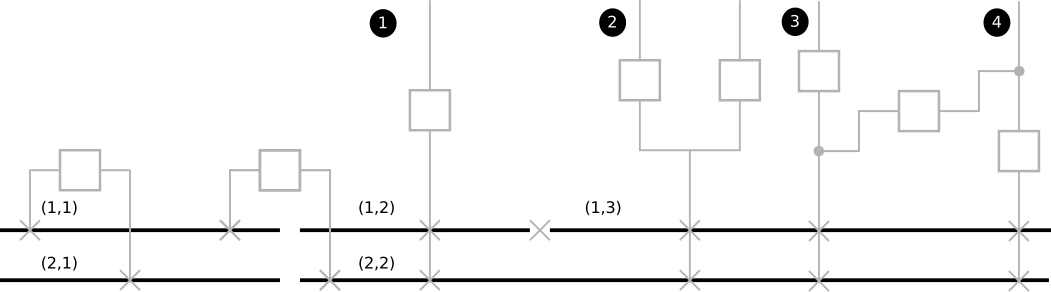 (h,v) positions of
 BusNodes and ExternCell cells order
Available implementations
Two implementations are available:
PositionFromExtensionwhich rely on explicitly given positions (for example, to reflect the on-site real structure and/or the way the SCADA organizes it). See PositionFromExtensionPositionByClusteringwhich finds an organization of theVoltageLevelwith no other information than the graph itself. See PositionByClustering
Both rely on the BSCluster (see BSCluster) and have the same skeleton:
Step 1: Build of
VerticalBusSetsStep 2: Build of unitary
BSClusterin thebsClusterslistStep 3: Merge of
bsClsutersinto a singleBSClusterStep 4: Build of the
List<Subsection>subsections
Illustration of algorithms based on BSCluster
The illustration will be based on the following graph and shall result in the above layout.
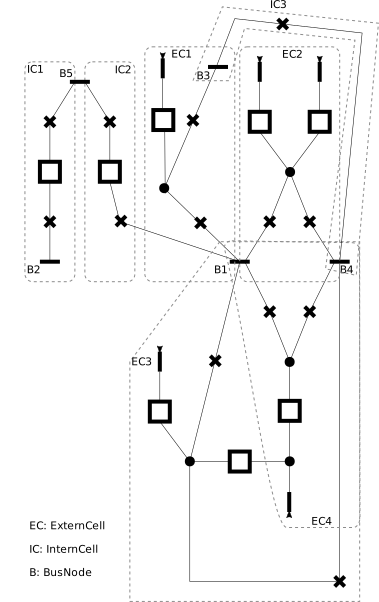
Step 1: Build VerticalBusSets
The result of VerticalBusSet.createVerticalBusSets is
VerticalBusSet |
BusNodes |
ExternCells |
InternCellSides |
|---|---|---|---|
vbs-1 |
B3, B1 |
EC1 |
IC2.R, IC3.L |
vbs-2 |
B2 |
IC1.L |
|
vbs-3 |
B1, B4 |
EC2, EC3, EC4 |
IC3.R |
vbs-4 |
B5 |
IC1.R, IC2.L |
Note: At that stage, the
LEFTandRIGHTside of anInternCellis arbitrary. They will be flipped if necessary later on (handled inSubsection.createSubsections).
Step 2: Build unitary BSClusters
This consist in creating one BSCluster per VerticalBusSet. This results in:
BSCluster |
VerticalBusSets |
HorizontalBusLists |
|---|---|---|
bsc-1 |
[ ( [B3, B1] , [EC1] , [IC2.R, IC3.L] ) ] |
[ [B3] , [B1] ] |
bsc-2 |
[ ( [B2] , , [IC1.L] ) ] |
[ [B2] ] |
bsc-3 |
[ ( [B1, B4] , [EC2, EC3, EC4] , [IC3.R] ) ] |
[ [B1], [B4] ] |
bsc-4 |
[ ( [B5] , , [IC1.L , IC2.L] ) ] |
[ [B5] ] |
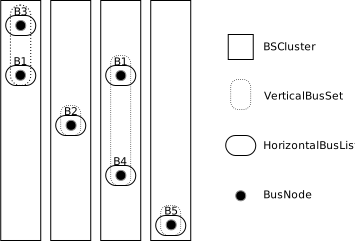
Important - On this result:
It is representative of the general case. But note that for
PositionFromExtension, theverticalBusSetsis sorted to end up to a ready-to-mergebsClusters. See PositionFromExtension.In this picture, the
NodeBusare on different rows to show that they are not necessarily aligned. Only bothB1will necessarily be on the same row.
Step 3: Merge BSClusters into a single one
That’s where the magic happens. This is where the implementations mainly differ. The goal is to merge the BSClusters to one another.
The principle of the merging of a BSCluster are:
simply concat the
VerticalBusSetListmerge the
HorizontalBusListusing a proper implementation ofHorizontalBusLane::mergeHbl.
This expected result should be similar to the following BSCluster:
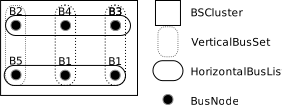
VerticalBusSets |
HorizontalBusLists |
|---|---|
[ |
[ |
The way this example is handled is detailed in each implementation documentation: PositionFromExtension, PositionByClustering.
Step 4: Build the List<Subsection>
See Subsection.