SVG Parameters
The SLD SvgParameters is the configuration class to determine how to customize the SVG render of a single line diagram.
The way to integrate it is to set a SvgParameters value object to a SldParameters before drawing the SVG.
Use example:
SvgParameters svgParams = new SvgParameters();
SldParameters sldParams = new SldParameters().setSvgParameters(svgParams);
SingleLineDiagram.draw(network, "VL1", Path.of("/tmp/vl1.svg"), sldParams);
Identifier and naming parameters
prefixId
Default value: is empty
The prefix to set on SVG generated identifiers (attributes ids and xml elements (cells)). It is useful to distinct id collapsing when several SVG are displayed on the same HTML page.
useName
Default value: false
Boolean value to determine whether we identify an equipment node (EquipmentNode) by its id or its name. When set to true the identification is based on the name.
diagramName
Default value: null
The diagram name to display in the title or SVG header
Value formatter parameters
The ValueFormatter consumes some of the SvgParameters, related to the value precision and language to format electrical values to display.
powerValuePrecision
Default value: 0
Number of decimals for active and reactive power display (in kV).
svgParams.setPowerValuePrecision(2);


voltageValuePrecision
Default value: 1
Number of decimals for voltage display (in kV).
currentValuePrecision
Default value: 0
Number of decimals for current display (in A or kA, depending on currentUnit value).
angleValuePrecision
Default value: 1
Number of decimals for phase angles display (in degrees °).
percentageValuePrecision
Default value: 0
Number of decimals for percentage display (power report rate, etc..).
languageTag
Default value: en
Language tag to dertermine the Locale used for number formatting (decimal separator, etc…)
undefinedValueSymbol
Default value: \u2014 (—) (em dash unicode for undefined value)
Symbol to display in place of a numerical value when that value is not defined (e.g. for undefined current, power, angle, percentage, voltage values for use cases: power flow not calculated, sensor missing).
Units parameters
currentUnit
Default value: is empty
Unit suffix displayed after active power values. Examples: “A”, “kA”. init_current_arrow.svg
svgParams.setCurrentUnit("A");


activePowerUnit
Default value: is empty
Unit suffix displayed after current values. Examples: “MW”, “kW”.
svgParams.setActivePowerUnit("MW");

reactivePowerUnit
Default value: is empty
Unit suffix displayed after current values. Examples: “MVAR”, “kVAR”.
svgParams.setReactivePowerUnit("MVAR");

Margin and spacing parameters
busInfoMargin
Default value: 0.0
Horizontal offset of the busInfo (info about the busbar state) indicator related to the busbar. Can be negative in order to offset to the left. Useful for avoiding overlaps with other graphical elements.
feederInfosIntraMargin
Default value: 10
Vertical spacing between data of a same feeder.
For instance, is P and Q are displayed then the distance between both values is set by this parameter.
svgParams.setFeederInfosIntraMargin(50);

feederInfosOuterMargin
Default value: 20
External spacing between the equipment symbol (breaker, transformer, generator…) and the beginning of the feeder data block (active and reactive power…).
svgParams.setFeederInfosOuterMargin(50);

Labeling and tagging parameters
angleLabelShift
Default value: 15. (in degree (°))
Defines the rotation angle applied to the feeder labels (resp. bus labels) when the parameter labelDiagonal (resp. busLabelDiagonal) is set to true.
svgParams.setAngleLabelShift(45);
svgParams.setLabelDiagonal(true);
svgParams.setBusLabelDiagonal(true);

labelCentered
Default value: false
When true equipments tags are centered.
When false equipments tags are aligned on the left or following the renderer position rules.
svgParams.setLabelCentered(true);

labelDiagonal
Default value: false
When true feeder labels are displayed diagonally with an angle set by the angleLabelShift. Useful for substations with many feeders to avoid text overlaps.
svgParams.setLabelDiagonal(true);

busLabelDiagonal
Default value: false
When true bus labels are displayed diagonally with an angle set by the angleLabelShift.
svgParams.setBusLabelDiagonal(true);

SVG rendering parameters
cssLocation
Default value: CssLocation.INSERTED_IN_SVG
Controls where and how the CSS is integrated within the generated SVG when adding the style in the SvgWriter. 3 modes available:
INSERTED_IN_SVG: directly in the SVG via a<style>tag (recommended for standalone exports)EXTERNAL_IMPORTED: external style sheets file referenced in a<style>tag from the SVG thanks to an@importurl. Requires the CSS to be accessible via the referenced URL. Useful for web integrations with dynamic themes.EXTERNAL_NO_IMPORT: no CSS style integrated or imported. The style sheets file must be related to the integration environment (via<link>in the HTML parent).
svgParams.setCssLocation(SvgParameters.CssLocation.EXTERNAL_NO_IMPORT);
svgWidthAndHeightAdded
Default value: false
Used in the default SVG writer.
When true, width and height attributes are added to the root <svg> tag and set with the diagram width and height.
When false viewBox is redefined to let the SVG more flexible for web inegration (CSS responsive).
svgParams.setSvgWidthAndHeightAdded(true);
avoidSVGComponentsDuplication
Default value: false
Used in the default SVG writer to chose between direct writing of components or creation of reusable definitions via <defs> tag.
When true identical graphic components in SVG are defined only once with a <defs> tag and then reused with <use href="...">. It reduces the SVG file weight, usefull for big nework with multipl identical components.
svgParams.setAvoidSVGComponentsDuplication(true);
drawStraightWires
Default value: false
When true connections between equipments are drawn with straight lines instead of routing algorithm calculated polyline paths. The renderer is more simple but too simple for complexes schemes readability.
svgParams.setDrawStraightWires(true);


Displaying parameters
feederInfoSymmetry
Default value: false
When true feeder data are displayed symmetrically on both sides of the equipment symbol.
svgParams.setFeederInfoSymmetry(true);


busesLegendAdded
Default value: false
When true a busbar legend is added to the diagram, explaining the mapping between CSS colors (on buses), base voltages value and busbar indices.
svgParams.setBusesLegendAdded(true);

tooltipEnabled
Default value: false
When true, a tooltip (native <title> tag) is added to graphical components when hovering it in JavaScript.
svgParams.setTootltipEnabled(true);
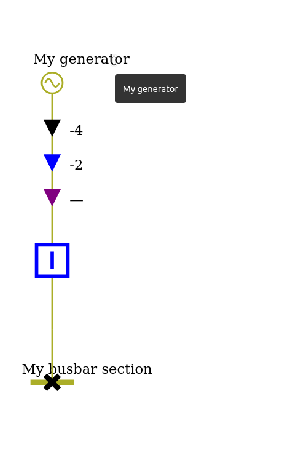
showGrid
Default value: false
When true a debugging grid is superimposed on the diagram, revealing the positioning grid used by the layout algorithm.
svgParams.setShowGrid(true);

showInternalNodes
Default value: false
When true internal nodes are displayed on the diagram (fictitious nodes not associated to physical equipments are rendered on the diagram).
svgParams.setShowInternalNodes(true);

displayEquipmentNodesLabel
Default value: false
When true text labels (id or name) are also displayed on the nodes representing equipments.
svgParams.setDisplayEquipmentNodesLabel(true);

displayConnectivityNodesId
Default value: false
When true connectivity nodes identifiers are displayed on the diagram. Should be used with the displaying of internal nodes parameter (see ShowInternalNodes)
svgParams.setDisplayConnectivityNodesId(true);
svgParams.setShowInternalNodes(true);

unifyVoltageLevelColors
Default value: false
When true all the base voltages of a sub station diagram are displayed with the same color instead of one color per base voltage. Useful for simplifying the readability or uniform graphical chart.
svgParams.setUnifyVoltageLevelColors(true);

