PositionFromExtension: Position from an explicit configuration
Context
PositionFromExtension implements PositionFinder and takes the information from the iidm extension to organize BSClusters. When building the VoltageLevelGraph, NetworkGraphBuilder retrieves and sets:
BusNode.busbarIndexandBusNode.sectionIndex,FeederNode.orderwhich is used to defineExternCells::getOrder
Algorithm
Principle
The algorithm considers that the positional information given (by the iidm extension) is coherent. Sorting orders are
defined based on this information and are used when building VerticalBusSets and BSClusters. These objects can then
be arranged relying on the consistency inherited from the given coherent orders.
The algorithm may not sound straightforward, but that approach eases the elaboration of the next step (building of
List<Substation>), and naturally addresses the constraints raised by non horizontally symmetrical arrangements of
BusNodes (case developed in the example below).
Steps
PositionFromExtension::indexBusPositionbuilds theMap<BusNode, Integer> busToNbPositionFromExtension::organizeBusSets:builds
List<BSCluster>bsClustersby providing the list of initialVerticalBusSetsorted by the comparatorVBSCOMPARATORmerges
bsClusterssequentially by merging the firstBSClusterof the list with the second until only one remain.
Sorting the BusNodes of the VerticalBusSets
This sorting order helps busbarIndex reflect the vertical view of the structure.
The algorithm relies on the fact that PositionFromExtension::indexBusPosition sorts the BusNodes by their busbarIndex
(first, and then by their sectionIndex). In PositionFromExtension, this order will never be modified later on,
ensuring the lower the busbarIndex is, the higher it will be vertically laid out.
For example,
if
BusNodeA has a lowerbusBarIndexthan the one of B,A will be before B in a
VerticalBusSet,A will be laid out above B.
Sorting the bsClusters
This sorting order helps sectionIndex reflect the horizontal view of the structure.
VBSCOMPARATOR is designed to sort the given List<VerticalBusSet>verticalBusSet using the positional information
given by the extension. It sorts:
First and most important sorting rule: compare
sectionIndex(which corresponds to horizontal order) ofBusNodeshaving the samebusbarIndex. i.e.:Match a pair of
BusNodeshaving the samebusbarIndex, taken in:the right side of the first
BSClusterthe left side of the second
BSCluster.
If they have different
BusNode.sectionIndex, return the differenceif they are equal, then try again with another pair.
Else, compare
BusCell::getOrderofBusCellsin bothVerticalBusSetsElse, some rules, to ensure uniqueness.
Merging
The merging process consists in repeating the merging of the first BSCluster with the second one until only one remains.
HorizontalBusListsMerger::mergeHbl merges the HorizontalBusLists from the 2 BSClusters by concatenating them when
they have the same busbarIndex. As the BSClusters is sorted by busbarIndex, there is a coherent progression in
each merged HorizontalBusList.
Example
The end in mind
The picture hereafter shows what we expect to display. The complete information from the extension is given.
(h,v) positions of BusNodes and ExternCell cells order
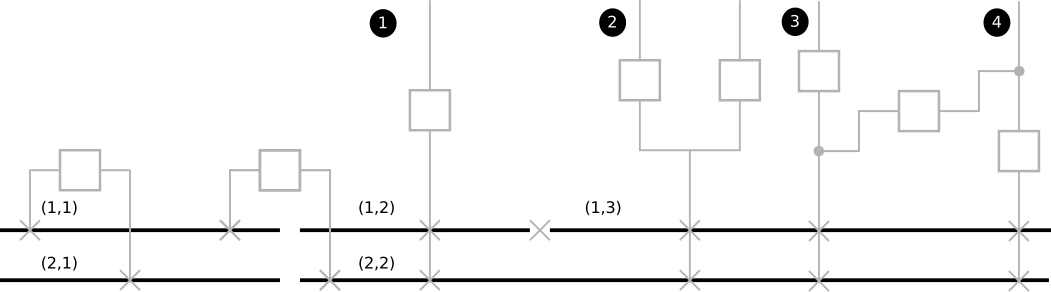
Input information
The raw graph looks like:
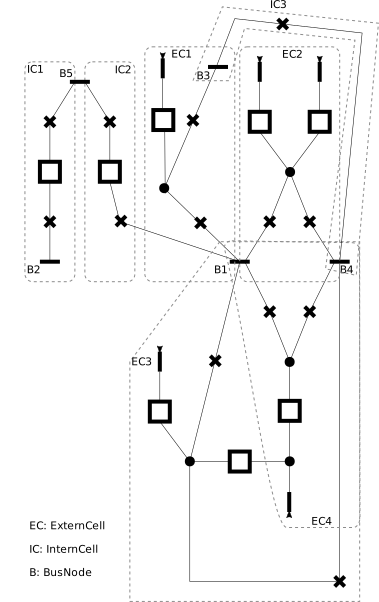
For which the information is represented as follows:
raw Bus id |
(busbarIndex, sectionIndex) |
|---|---|
B1 |
(2, 2) |
B2 |
(2, 1) |
B3 |
(1, 2) |
B4 |
(1, 3) |
B5 |
(1, 1) |
And the ExternalCell order of ECx is x.
Steps
Step 1: Build of VerticalBusSets
First we define the Map<BusNode, Integer> busToNb according to the sorting order (busbarIndex, sectionIndex): vertical sorting.
raw Bus id |
Nb |
(busbarIndex, sectionIndex) |
|---|---|---|
B5 |
1 |
(1, 1) |
B3 |
2 |
(1, 2) |
B4 |
3 |
(1, 3) |
B2 |
4 |
(2, 1) |
B1 |
5 |
(2, 2) |
Now VerticalBusSet.createVerticalBusSets will create the VerticalBusSet and they will be sort it according to VBSCOMPARATOR: horizontal sorting.
vbs |
BusNodes(busBarIndex, sectionIndex) |
ExternCells |
InternCellSides |
|---|---|---|---|
vbs-1 |
[ B5(1, 1) ] |
[ IC1.R, IC2.L ] |
|
vbs-2 |
[ B2(2, 1) ] |
[ IC1.L ] |
|
vbs-3 |
[ B3(1, 2), B1(2, 2) ] |
[ EC1 ] |
[ IC2.R, IC3.L ] |
vbs-4 |
[ B4(1, 3), B1(2, 2) ] |
[ EC2, EC3, EC4 ] |
[ IC3.R ] |
Note the position of vbs-2, as B2(2,1) shall be before B1(2,2).
Step 2: Build of unitary BSClusters
This consist in creating one BSCluster per VerticalBusSet. This results in:
BSCluster |
VerticalBusSets |
HorizontalBusLists |
|---|---|---|
bsc-1 |
[ ( [ B5 ] , , [ IC1.R , IC2.L ] ) ] |
[ [ B5(1, 1) ] ] |
bsc-2 |
[ ( [ B2 ] , , [ IC1.L ] ) ] |
[ [ B2(2, 1) ] ] |
bsc-3 |
[ ( [ B3, B1 ] , [ EC1 ] , [ IC2.R, IC3.L ] ) ] |
[ [ B3(1, 2) ] , [ B1(2, 2) ] ] |
bsc-4 |
[ ( [ B1, B4 ] , [ EC2, EC3, EC4 ] , [ IC3.R ] ) ] |
[ [ B1(2, 2) ], [ B4(1, 3) ] ] |
Step 3: Merge of BSClusters into a single one
BSCluster |
VerticalBusSets |
HorizontalBusLists |
|---|---|---|
bsc-12 |
[ ( [ B5 ] , , [ IC1.R , IC2.L ] ), |
[ [ B5(1,1) ], |
bsc-123 |
[ ( [ B5 ] , , [ IC1.R , IC2.L ] ), |
[ [ B5(1,1), B5(1,1), B3(1,2) ], |
Resulting BSCluster |
[ ( [ B5 ] , , [ IC1.R , IC2.L ] ), |
[ [ B5(1,1), B5(1,1), B3(1,2), B4(1,3) ], |
This results in:
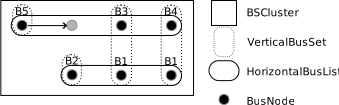
Note – On the merge of bsc-1 + bsc-2:
bsc-1 and bsc-2 have only one
NodeBusin theirVerticalBusSet. The parallelization of both will be handled bySubsection::createSubsectionsby an absorption mechanism.in its
HorizontalBusList, B5 is replicated until a change occurs, but this replication has no impact on theVerticalBusSet(ie [ B2 ] is not extended to [ B5, B2 ]).
HorizontalBusListhas astartingIndexwhich implies it does not necessarily align on the left side. That’s the case of the second one for which thestartingIndexis 2.
Step 4: Build of the List<Subsection>subsections
Done by calling Subsection::createSubsections. See Subsection.